This article will explain the purpose of the Accounting Reconciliation Tool, where it is located and how to read the information it provides
What is the purpose of this tool
This tool provides the Dealership with the most recently recorded comparisons between Blackpurl and your Accounting Program (Xero or QBO) for each of the relevant BP Control Accounts
It will also indicate the last time a variance between the two systems was recorded and give you access to each time a variance occurred
This will then allow the Dealership to review and investigate why the relevant Control Account General Ledgers in your Accounting Program do not match Blackpurl - has an error been made / has the Dealership deleted accounting integrated transactions or modified the amounts etc
Accounting Reconciliation should be done a regular basis. This is the relevant article to review - Account Reconciliations - Xero and QuickBooks Online
Where is the Accounting Reconciliation located
This tools is located under the Blackpurl Header > Tools - Accounting Reconciliation
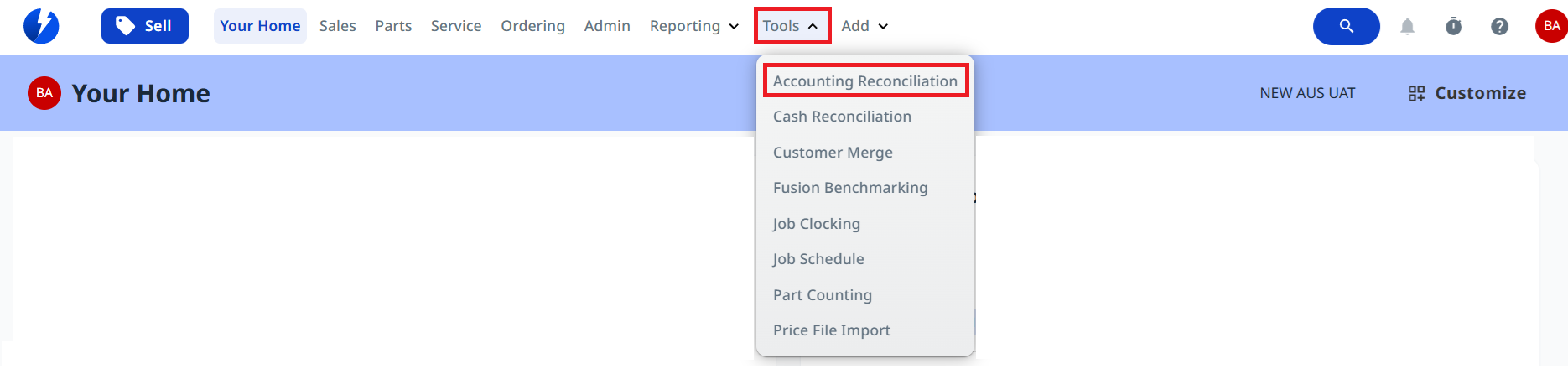
Simply click on the Accounting Reconciliation option from the Tools menu to run
Explanation of the information
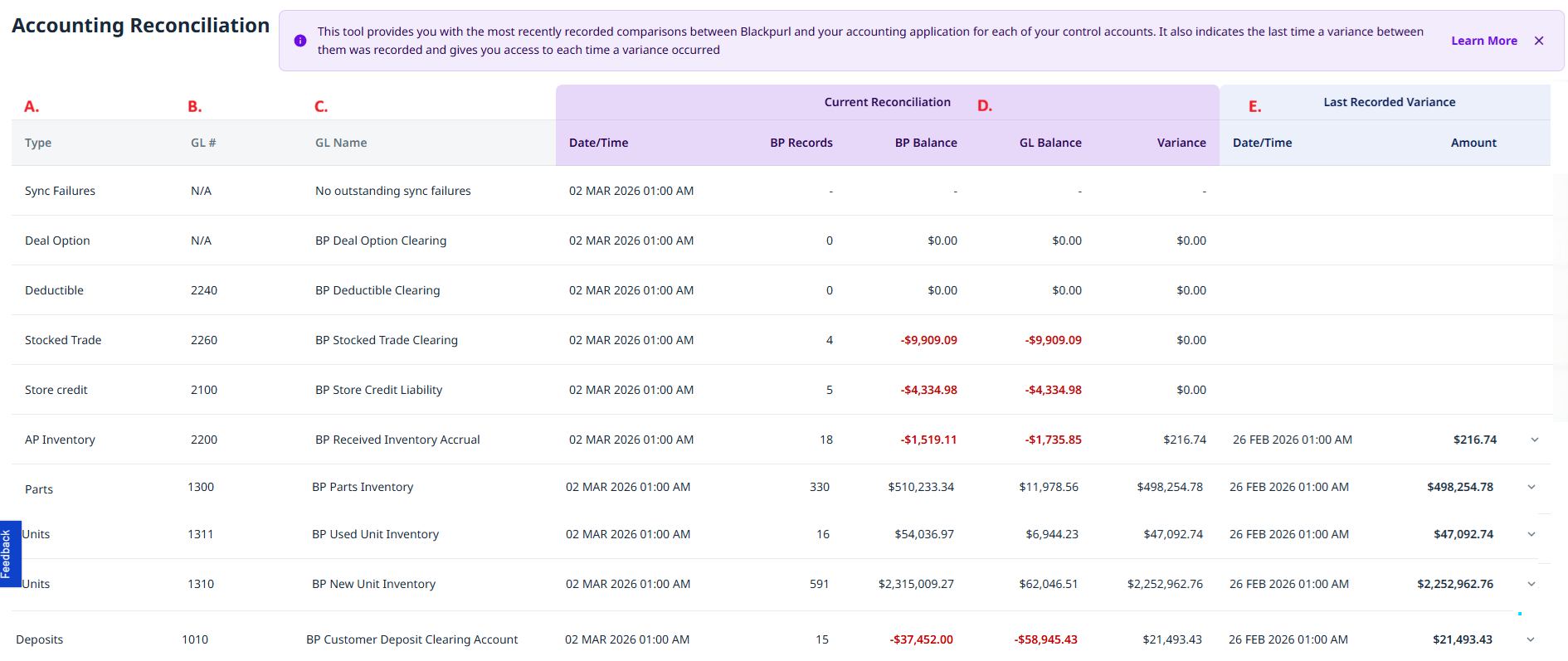
| A. | Type | It will list the type of accounting reconciliations: Sync Failures - It will indicate if you have accounting sync failures and/or for our Dealerships with WPM/Shopify integration, it will list any sync failures Deal Options - this is one of our Blackpurl Control Accounts Deductible - this is one of our Blackpurl Control Accounts Stocked Trade - this is one of our Blackpurl Control Accounts Store Credit - this is one of our Blackpurl Control Accounts AP Inventory - this is one of our Blackpurl Control Accounts Parts - this is one of our Blackpurl Inventory Accounts (you may have a few listing and it would depend on what Categories for Parts you have) Units - this is one of our Blackpurl Inventory Accounts (you may have a few listing and it would depend on what Categories for Units you have) Deposits - this is one of our Blackpurl Control Accounts |
| B. | GL# | It will list the relevant General Ledger number in your Accounting Program that the Control Account in Blackpurl is mapped to |
| C. | GL Name | It will list the full name of the General Ledger in your Accounting Program that the Control Account in Blackpurl is mapped to |
| D. | Current Reconciliation | This section will list the current reconciliation Date/Time - when the last reconciliation snap shot was taken BP Record - how many BP records are involved BP Balance - the balance of that account as indicated by Blackpurl GL Balance - the balance of that account as indicated by the relevant General Ledger Variance - what the variance currently is |
| E. | Last Recorded Variance | This section list the last recorded variance Date/Time - when the last variance was recorded Amount - what was the amount of the last variance recorded |
Was this article helpful?
That’s Great!
Thank you for your feedback
Sorry! We couldn't be helpful
Thank you for your feedback
Feedback sent
We appreciate your effort and will try to fix the article